
Why Every Laptop User Needs a Cooling Pad: Benefits and Features Explained
Hey there, laptop users! Have you ever felt your laptop getting super hot while you’re working or playing games? It can be annoying, right? Well, that’s where a cooling pad comes in. A laptop cooling pad is like a special stand for your laptop that helps keep it cool. In this blog, we’ll talk about why every laptop user needs a cooling pad. We’ll look at how it stops overheating, makes your laptop run better, and helps it last longer. By the end, you’ll see why getting a cooling pad is a smart idea.
First off, let’s think about what happens when your laptop gets too hot. The inside parts, like the brain of the computer called the CPU, work hard and make heat. If that heat doesn’t go away, bad things can happen. Your laptop might slow down or even shut off by itself. That’s no fun, especially if you’re in the middle of something important. A cooling pad fixes this by blowing cool air under your laptop. It has fans that push air around and take the heat away. This keeps everything at a nice temperature.
Many people don’t know how big a deal overheating is. But studies and experts say it’s a top reason laptops break early. Using a cooling pad can change that. It not only prevents problems but also makes your daily use better. Imagine typing on a cool laptop instead of a hot one. Your hands won’t sweat, and you’ll feel more comfortable. Plus, for gamers or people who edit videos, a cooling pad is a must. It lets your laptop handle tough jobs without getting tired from the heat.
In this post, we’ll dive deep into the benefits. We’ll explain how a cooling pad works to prevent overheating. Then, we’ll show how it boosts performance so your apps run faster. After that, we’ll discuss how it extends the life of your laptop, saving you money in the long run. We’ll also cover cool features like adjustable heights and quiet fans. And to top it off, we’ll recommend some of the best cooling pads for 2025 based on recent reviews. So, stick around and learn why a cooling pad should be your next buy.
What is a Cooling Pad?
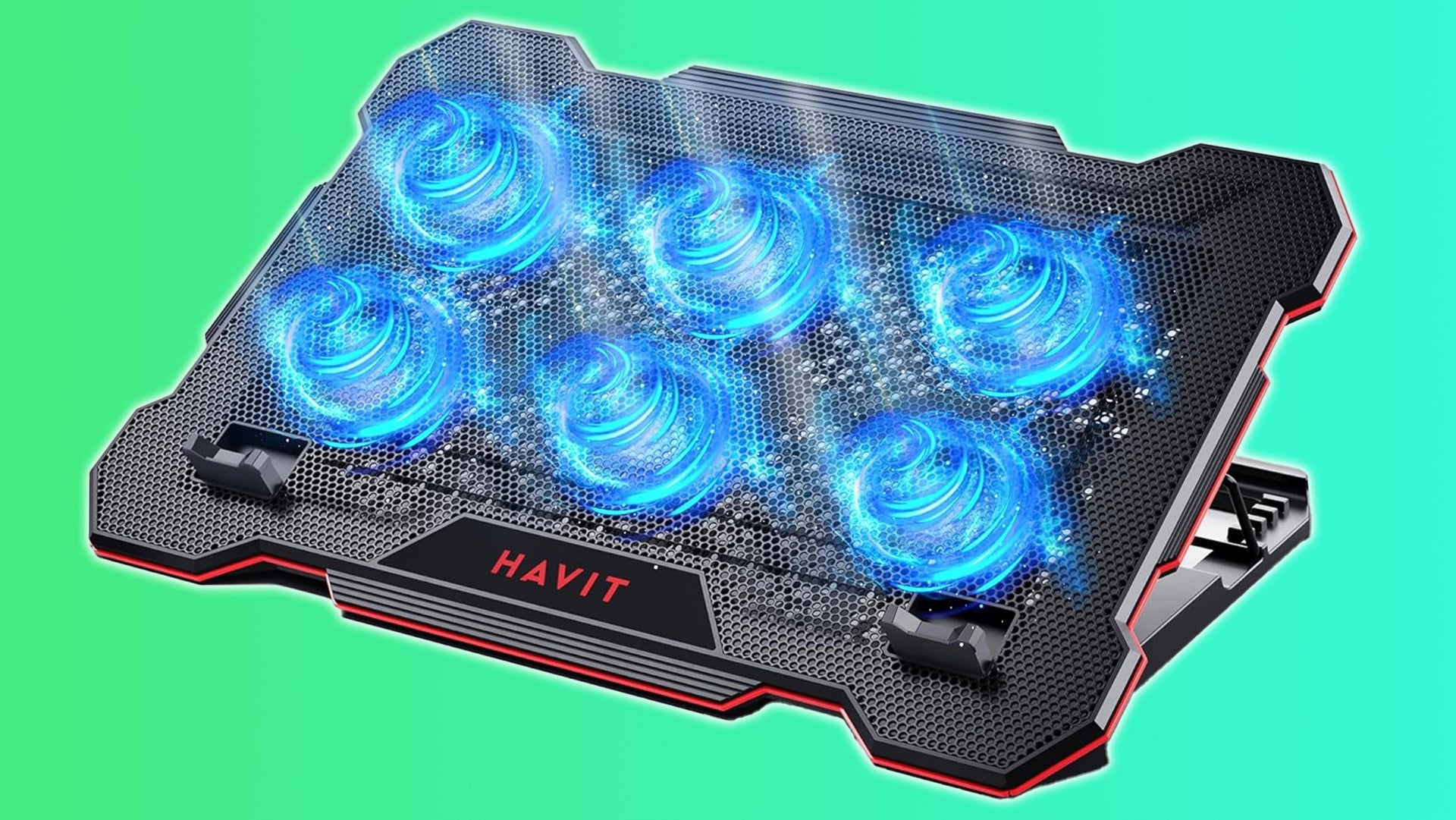
A cooling pad is a simple but powerful tool for your laptop. It’s basically a flat pad with built-in fans that you place your laptop on. The fans spin and create airflow under the laptop, which helps pull heat out from the bottom vents. Most laptops have their cooling systems inside, but they can get blocked if you put the laptop on a soft surface like a bed or your lap. A cooling pad raises the laptop up and gives it fresh air to breathe.
There are two main types of cooling pads: active and passive. Active cooling pads have fans that plug into your laptop’s USB port for power. They actively blow air to cool things down. Passive cooling pads don’t have fans; they use materials like metal to spread heat away naturally. Active ones are better for heavy use because they do more work. For example, if you’re running big programs, an active cooling pad can drop the temperature by 5 to 10 degrees Celsius.
Cooling pads come in different sizes to fit laptops from 12 inches to 17 inches or more. Some have one big fan, while others have multiple small fans for even cooling. They often have LED lights or RGB colors to look cool, especially for gamers. But the main job is to keep your laptop from overheating. Without a cooling pad, heat builds up inside, and that can lead to big issues over time.
Let’s talk about how a cooling pad is made. The top is usually a mesh or grill so air can flow through. The fans are quiet so they don’t bother you while working. Some cooling pads let you adjust the speed of the fans, so you can make them faster when needed. They also have rubber grips to hold your laptop steady. Portability is key too; many are lightweight and fold up for travel.
In short, a cooling pad is an easy add-on that every laptop user can benefit from. It doesn’t cost much, starting from around $20, but it pays off by protecting your expensive laptop. If you’ve never used one, try it out and feel the difference in how cool your laptop stays.
Why Laptops Overheat
Laptops are amazing machines, but they have a big problem: they get hot easily. Why? Because all the powerful parts are packed into a small space. The CPU and GPU are like the engines, and they produce heat when they work hard. Things like browsing the web are okay, but gaming, video editing, or running many tabs can make them sweat.
Another reason is poor airflow. Laptops have tiny vents on the bottom or sides to let hot air out. If you place your laptop on a blanket or carpet, those vents get covered. Dust builds up inside over time, blocking the fans and making cooling harder. Even the room temperature matters; if it’s hot outside, your laptop heats up faster.
Overheating isn’t just uncomfortable. It can cause the laptop to throttle, which means it slows down on purpose to cool off. This drops your performance right when you need it most. In bad cases, it can damage parts like the battery or motherboard. Batteries hate heat; they lose capacity faster in hot conditions.
Experts say laptops should stay under 80-90 degrees Celsius for the CPU. Above that, risks go up. Many users don’t notice until it’s too late, like when the laptop starts crashing or making weird noises from the fans working overtime.
A pad helps fix all this by providing extra airflow. It lifts the laptop and blows cool air directly where it’s needed. This prevents the buildup of heat and keeps everything running smoothly. Without one, you’re risking shorter battery life and more repairs.
Preventing Overheating with Cooling Pads
One of the top reasons to get a cooling pad is to stop overheating before it starts. Overheating happens when heat can’t escape fast enough. A cooling pad tackles this head-on with its fans. They create a breeze under the laptop, pushing hot air away and bringing in cool air.
For instance, during long sessions, like watching movies or working on spreadsheets, a cooling pad keeps temperatures steady. Tests show that cooling pads can reduce temps by up to 10-15 degrees. That’s enough to prevent shutdowns. Gamers love this because games make laptops super hot quickly.
pads also improve comfort. No more burning laps or hot keyboards. They raise the laptop to a better angle, which is easier on your wrists too. Some models have adjustable stands for the perfect height.
But how do they really work? The fans align with your laptop’s vents. Air flows in, cools the insides, and exits. This cycle prevents heat from sticking around. Passive pads use conduction, where heat moves to the pad’s metal surface and dissipates.
To make the most of a cooling pad, keep your laptop clean. Dust off the vents regularly. Use the cooling pad on a hard surface for best results. Combine it with software that monitors temps, so you know when to turn up the fans.
In hot climates or small rooms, a pad is even more important. It fights against the environment to keep your laptop safe. Overall, preventing overheating with a cooling pad means fewer worries and more reliable use every day.
Improving Performance with Cooling Pads
Did you know a pad can make your laptop faster? It’s true! When laptops get hot, they slow down to protect themselves. This is called thermal throttling. The CPU reduces its speed, so tasks take longer.
With a cooling pad, throttling happens less. Your laptop stays cool, so it can run at full speed longer. For example, in games, you get higher frame rates without drops. Video rendering or photo editing finishes quicker too.
Performance gains come from better airflow. pads supply fresh air to the internal fans, making them more effective. This keeps the processor and graphics card happy, leading to smoother operation.
Users report 5-10% better speeds in benchmarks after using a cooling pad. That’s like getting a free upgrade. For work, it means multitasking without lag. Open more apps, switch faster, get more done.
Cooling pads with multiple fans cover more area for even cooling. Some have speed controls to match your needs. Quiet modes for light work, high for heavy loads.
Don’t forget about noise. Internal fans spin less with a cooling pad helping, so your laptop is quieter. This improves focus during calls or studying.
In 2025, with powerful laptops like gaming ones, a cooling pad is key for peak performance. It unlocks the full potential without heat holding it back.
Extending Laptop Lifespan with Cooling Pads
Heat is a laptop’s worst enemy for longevity. Constant high temps wear out parts like the battery, hard drive, and circuits. A cooling pad fights this by keeping things cool, so components last longer.
Batteries degrade faster in heat. They lose charge capacity over time, but cooling slows that down. You might get an extra year or two from your battery with a cooling pad.
The CPU and GPU also suffer from thermal stress. Overheating can cause micro-damage that adds up. By reducing temps, a cooling pad prevents this, extending overall life.
Think about it: laptops cost a lot. Repairing or replacing early is expensive. A cheap cooling pad saves money by avoiding that. Experts say regular cooling can add 1-3 years to a laptop’s usable life.
pads also reduce dust buildup. Better airflow means less dust settles inside, which can cause failures. Clean internals mean fewer breakdowns.
For heavy users, like students or pros, this is huge. Your laptop stays reliable for school or jobs longer. Even casual users benefit from less wear.
Pair a cooling pad with good habits, like not overcharging, for max lifespan. It’s a simple step with big rewards.
Key Features of Cooling Pads
When shopping for a cooling pad, look for key features that make a difference. First, fan count and size. More fans mean better coverage. Big fans move more air quietly.
Noise level is important. Good cooling pads have quiet fans, under 30 decibels, so they don’t distract.
Adjustable height is great for ergonomics. It tilts the laptop for better typing and viewing, reducing neck strain.
Power source: most use USB, but some have adapters for more power. Extra USB ports on the pad let you plug in other devices.
Build quality matters. Metal meshes are durable and conduct heat well. Plastic ones are lighter but might not last as long.
RGB lighting adds fun, especially for gamers. But it’s optional if you want simple.
Portability: foldable designs are easy to carry. Weight under 2 pounds is ideal.
Speed controls let you tweak fan power. Some have auto modes that adjust based on temp.
Compatibility: check size for your laptop. Most fit 15-17 inches, but measure.
These features make cooling pads versatile and user-friendly.
Best Cooling Pads in 2025
Looking for the top cooling pads this year? Based on reviews, the Llano Gaming Laptop Cooler stands out. It has powerful fans that drop temps a lot, with RGB lights and adjustable speeds. Users love how it keeps gaming laptops chill during long sessions.
Next, the Razer Laptop Pad is premium. It’s built tough with quiet operation and fits big laptops. Reviews say it boosts performance without noise.
The Thermaltake Massive 20 RGB is another winner. Adjustable fans and ergonomic design make it comfy. It’s great for work and play.
For budget, try the Kootek Cooler. Five fans for even cooling, quiet, and affordable.
The HAVIT HV-F2071 is portable with strong airflow. Perfect for travel.
These picks from 2025 reviews show cooling have advanced for better cooling and features.
How to Choose a Cooling Pad
Choosing the right cooling pad is easy if you know what to look for. Start with your laptop size. Measure the screen diagonal and pick a pad that matches or is bigger.
Think about use. Gamers need strong fans; office users can go lighter.
Read reviews for real feedback on noise and effectiveness.
Check power: USB is convenient, but ensure it doesn’t drain battery fast.
Budget: good ones start at $20, premium up to $50.
Try brands like Thermaltake or Llano for quality.
Pick one with warranty for peace of mind.
Conclusion
In wrap-up, a pad is essential for every laptop user. It prevents overheating, improves performance, and extends lifespan. With features like quiet fans and adjustable stands, it’s a no-brainer. Get one today and enjoy a cooler, faster laptop. Your device will thank you!


Leave A Comment