Easy Configuration;Advanced Firewall Features; UPnP Support Security Protocol: Wpswpa2-Psk

Wi-fi Ethernet


Original price was: ₹1,800.00.₹749.00Current price is: ₹749.00.
Easy Configuration;Advanced Firewall Features; UPnP Support Security Protocol: Wpswpa2-Psk
Wi-fi Ethernet
In today’s digital age, a reliable Wi-Fi Ethernet router is essential for seamless internet connectivity, whether for home, office, or small business use. The D-Link DIR-615, a single-band wireless router, is a standout choice for users seeking high-speed wireless networking, advanced security, and versatile functionality. With its robust feature set, including Guest Mode, Dynamic IP Support, Wireless Client Bandwidth Limitation, and multiple operating modes, this router delivers exceptional performance for a variety of networking needs. This comprehensive guide explores the D-Link DIR-615’s specifications, features, setup process, and benefits, optimized for the focus keyword Wi-Fi Ethernet to help you make an informed decision.
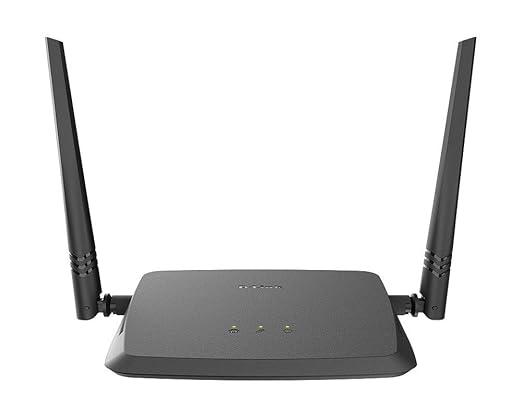
The D-Link DIR-615 is a high-performance, single-band Wi-Fi Ethernet router designed to provide reliable internet connectivity for homes and small offices. Operating on the 2.4 GHz frequency band, it supports 802.11b, 802.11g, and 802.11n wireless communication standards, delivering speeds of up to 300 Mbps. This makes it an excellent choice for users who need a dependable Wi-Fi Ethernet solution for streaming, browsing, gaming, and other online activities.
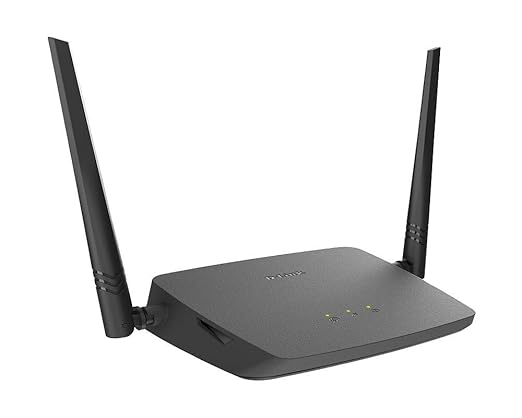
Equipped with high-gain Omni antennas, the DIR-615 ensures broad coverage and strong signal strength, even in larger homes or offices. Its support for advanced features like IPv6, TR-069, VLAN, and Static Routing makes it a versatile and future-proof option for users seeking a Wi-Fi Ethernet router with enterprise-grade capabilities. Additionally, the router’s easy configuration and advanced firewall features ensure a secure and user-friendly experience.
In this guide, we’ll dive into the key features, technical specifications, setup process, and benefits of the D-Link DIR-615, emphasizing why it’s a top choice for Wi-Fi Ethernet connectivity.
The D-Link DIR-615 is packed with features that make it a standout Wi-Fi Ethernet router. Below, we explore its key capabilities in detail:
The D-Link DIR-615 delivers N 300 Mbps wireless speeds, making it ideal for bandwidth-intensive tasks like HD video streaming, online gaming, and large file transfers. By leveraging the 802.11n wireless standard, this Wi-Fi Ethernet router ensures fast and stable connections, even when multiple devices are connected simultaneously. Whether you’re working from home or streaming content, the DIR-615 provides the speed and reliability you need.
One of the standout features of the DIR-615 is its high-gain Omni antenna, which enhances signal strength and coverage. This ensures that your Wi-Fi Ethernet network reaches every corner of your home or office, minimizing dead zones and providing consistent connectivity. The Omni antenna design is particularly beneficial for users in multi-room environments or those with multiple floors.
The D-Link DIR-615 supports multiple operating modes, including Router, Access Point (AP), Repeater, and Client. This versatility allows you to customize the router’s functionality to suit your specific needs:
Router Mode: Connects to your modem to create a Wi-Fi Ethernet network for multiple devices.
Access Point Mode: Extends an existing wired network into a wireless one.
Repeater Mode: Boosts the range of an existing Wi-Fi Ethernet network.
Client Mode: Connects wired devices to a wireless network, acting as a bridge.
This flexibility makes the DIR-615 a highly adaptable Wi-Fi Ethernet solution for various networking scenarios.
Security is a top priority for any Wi-Fi Ethernet router, and the D-Link DIR-615 excels in this area. It supports WPA/WPA2-PSK security protocols, ensuring that your network is protected from unauthorized access. Additionally, the router includes advanced firewall features such as NAT (Network Address Translation), SPI (Stateful Packet Inspection), IP Filter, MAC Filter, DMZ, and DDoS prevention. These features provide robust protection against cyber threats, making the DIR-615 a secure choice for your Wi-Fi Ethernet network.
The DIR-615’s Guest Mode feature allows you to create a separate Wi-Fi Ethernet network for visitors. This ensures that guests can access the internet without compromising the security of your primary network. Guest Mode is particularly useful for small businesses, cafes, or homes that frequently host visitors, as it keeps your main network private and secure.
To ensure fair bandwidth distribution, the DIR-615 includes a Wireless Client Bandwidth Limitation feature. This allows you to allocate specific bandwidth limits to individual devices, preventing any single device from monopolizing the network. This is especially useful in households or offices with multiple users, ensuring a smooth Wi-Fi Ethernet experience for everyone.
The DIR-615 supports Dynamic IP (DHCP), which simplifies network configuration by automatically assigning IP addresses to connected devices. This eliminates the need for manual IP configuration, making it easier to set up and manage your Wi-Fi Ethernet network.
The DIR-615 is equipped with advanced features that enhance its functionality and future-proof your Wi-Fi Ethernet network:
IPv6 Support: Ensures compatibility with the latest internet protocol, preparing your network for future technologies.
TR-069: Allows service providers to remotely manage and configure the router, simplifying maintenance.
VLAN: Enables network segmentation for improved performance and security.
Static Routing: Provides greater control over network traffic, ideal for advanced users or small businesses.
These features make the DIR-615 a forward-thinking Wi-Fi Ethernet router that can adapt to evolving networking needs.
Setting up a Wi-Fi Ethernet router can be daunting, but the D-Link DIR-615 makes it effortless. You can configure the router using the D-Link Assistant Mobile App or the intuitive WEB GUI setup wizard. Both options guide you through the setup process step-by-step, ensuring that even non-technical users can get their Wi-Fi Ethernet network up and running in minutes.
The DIR-615 supports online firmware upgrades, ensuring that your router remains up-to-date with the latest features and security patches. This feature enhances the longevity and performance of your Wi-Fi Ethernet router, keeping it secure and efficient over time.
The DIR-615 includes UPnP (Universal Plug and Play) support, which simplifies the connection of devices like gaming consoles, smart TVs, and IoT devices to your Wi-Fi Ethernet network. UPnP enables seamless communication between devices, making it easier to set up media streaming or online gaming.
D-Link stands behind the DIR-615 with a three-year brand warranty, providing peace of mind and ensuring long-term reliability. This makes the DIR-615 a cost-effective and dependable Wi-Fi Ethernet solution for home and small office users.
To provide a clear understanding of the D-Link DIR-615’s capabilities, here are its key technical specifications:
|
Specification |
Details |
|---|---|
|
Brand |
D-Link |
|
Model Name |
DIR-615 |
|
Frequency Band Class |
Single-Band (2.4 GHz) |
|
Wireless Communication Standard |
802.11b, 802.11g, 802.11n |
|
Wireless Speed |
Up to 300 Mbps |
|
Antenna |
High-Gain Omni Antenna |
|
Operating Modes |
Router, Access Point, Repeater, Client |
|
Security Protocols |
WPA/WPA2-PSK, WPS |
|
Firewall Features |
NAT, SPI, IP Filter, MAC Filter, DMZ, DDoS Prevention |
|
Advanced Features |
IPv6, TR-069, VLAN, Static Routing |
|
Control Method |
D-Link Assistant Mobile App, WEB GUI |
|
Special Features |
Guest Mode, Wireless Client Bandwidth Limitation, UPnP Support |
|
Warranty |
3 Years |
These specifications highlight why the D-Link DIR-615 is a top-tier Wi-Fi Ethernet router for users seeking performance, security, and versatility.
The D-Link DIR-615 stands out as a top choice for Wi-Fi Ethernet connectivity due to its combination of affordability, performance, and advanced features. Here are some compelling reasons to choose this router:
Priced competitively, the DIR-615 offers N 300 Mbps speeds and advanced features typically found in higher-end routers. This makes it an excellent value for users seeking a reliable Wi-Fi Ethernet solution without breaking the bank.
The high-gain Omni antenna ensures wide coverage, making the DIR-615 ideal for homes and small offices with multiple rooms or floors. Whether you’re working, streaming, or gaming, you’ll enjoy a strong and stable Wi-Fi Ethernet connection.
With support for Router, Access Point, Repeater, and Client modes, the DIR-615 adapts to a wide range of networking scenarios. This versatility makes it a flexible Wi-Fi Ethernet solution for both home and business use.
The DIR-615’s WPA/WPA2-PSK encryption, combined with advanced firewall features like NAT, SPI, and DDoS prevention, ensures that your Wi-Fi Ethernet network remains secure from cyber threats.
The D-Link Assistant Mobile App and WEB GUI setup wizard make configuration a breeze, even for users with limited technical knowledge. This ensures that you can set up your Wi-Fi Ethernet network quickly and easily.
Support for IPv6, TR-069, VLAN, and Static Routing ensures that the DIR-615 is ready for future networking demands. This makes it a smart investment for users looking to future-proof their Wi-Fi Ethernet setup.
The Guest Mode feature allows you to provide internet access to visitors without compromising the security of your primary Wi-Fi Ethernet network. This is particularly useful for businesses or homes with frequent guests.
The Wireless Client Bandwidth Limitation feature ensures fair bandwidth distribution, preventing any single device from slowing down your Wi-Fi Ethernet network. This is ideal for multi-user environments.
With a three-year brand warranty and online firmware upgrades, the DIR-615 offers long-term reliability and support, ensuring that your Wi-Fi Ethernet network remains up-to-date and secure.
Setting up the D-Link DIR-615 is straightforward, thanks to its user-friendly configuration options. Follow these steps to get your Wi-Fi Ethernet network up and running:
Unbox the D-Link DIR-615 and ensure you have the router, power adapter, Ethernet cable, and quick start guide.
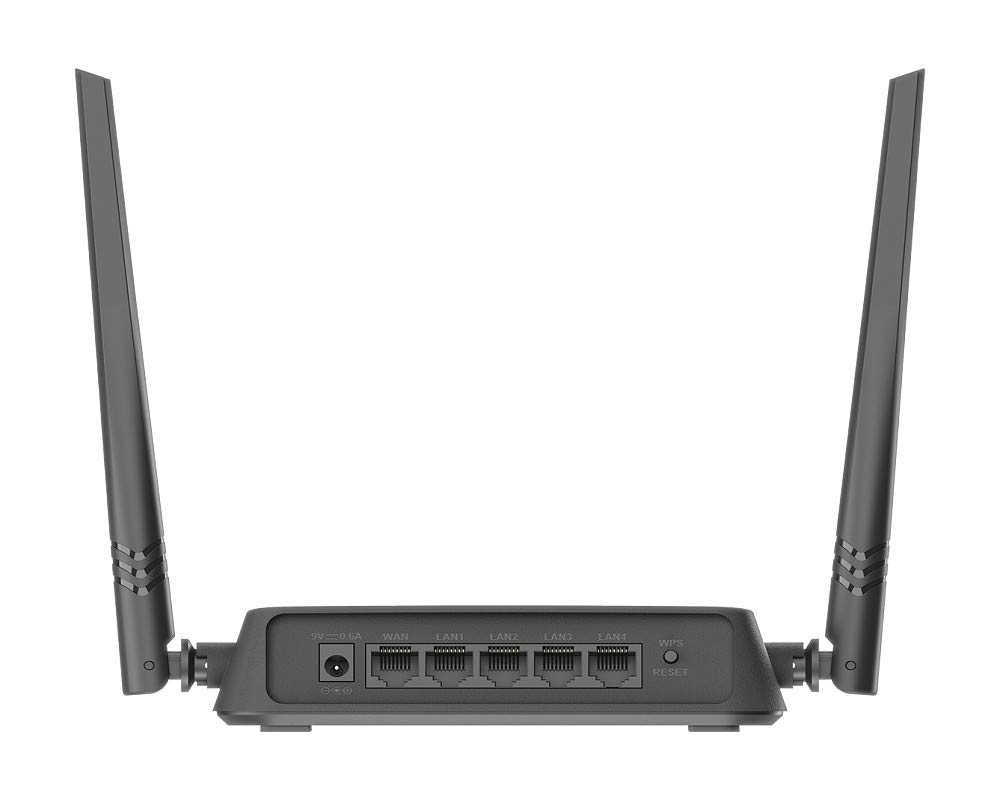
Connect the router to your modem using the provided Ethernet cable. Plug one end into the modem and the other into the WAN port on the DIR-615.
Plug the power adapter into the router and a power outlet, then turn on the router.
Connect a device (such as a laptop or smartphone) to the router’s Wi-Fi Ethernet network. The default Wi-Fi credentials are printed on the router’s label.
Open a web browser and enter http://192.168.0.1 or http://dlinkrouter.local to access the WEB GUI.
Alternatively, download the D-Link Assistant Mobile App from the App Store or Google Play and follow the on-screen instructions.
Log in to the router using the default credentials (usually “admin” for the username and a blank password, unless specified otherwise).
Follow the setup wizard to configure your Wi-Fi Ethernet network:
Set up your internet connection type (e.g., Dynamic IP/DHCP, PPPoE, or Static IP).
Create a Wi-Fi network name (SSID) and password.
Enable WPA/WPA2-PSK security for your network.
Save your settings and wait for the router to reboot.
Access the router’s advanced settings to configure features like Guest Mode, Wireless Client Bandwidth Limitation, VLAN, or Static Routing as needed.
Update the router’s firmware via the WEB GUI or mobile app to ensure you have the latest features and security patches.
Connect multiple devices to your Wi-Fi Ethernet network and test the connection speed and stability.
Verify that Guest Mode and other advanced features are functioning as expected.
By following these steps, you’ll have a fully functional Wi-Fi Ethernet network powered by the D-Link DIR-615.
To get the most out of your Wi-Fi Ethernet router, consider these optimization tips:
Place the DIR-615 in a central location to maximize the coverage of its high-gain Omni antenna. Avoid placing the router near walls, metal objects, or other electronics that could interfere with the Wi-Fi Ethernet signal.
Check for firmware updates through the D-Link Assistant Mobile App or WEB GUI to ensure your router has the latest features and security enhancements. This keeps your Wi-Fi Ethernet network running smoothly and securely.
Enable Guest Mode to provide secure internet access for visitors without exposing your primary Wi-Fi Ethernet network. This is especially useful for businesses or homes with frequent guests.
Use the Wireless Client Bandwidth Limitation feature to allocate bandwidth fairly among devices. This prevents any single device from slowing down your Wi-Fi Ethernet network, ensuring a smooth experience for all users.
Regularly update your Wi-Fi password and enable WPA/WPA2-PSK encryption to protect your Wi-Fi Ethernet network from unauthorized access. Use the router’s firewall features to block suspicious traffic and enhance security.
Use the router’s WEB GUI to monitor connected devices and network performance. This allows you to identify and address any issues that may affect your Wi-Fi Ethernet connection.
To help you decide if the D-Link DIR-615 is the right Wi-Fi Ethernet router for you, here’s how it compares to other routers in its class:
|
Feature |
D-Link DIR-615 |
Competitor A |
Competitor B |
|---|---|---|---|
|
Wireless Speed |
Up to 300 Mbps (802.11n) |
Up to 300 Mbps |
Up to 450 Mbps |
|
Frequency Band |
Single-Band (2.4 GHz) |
Single-Band (2.4 GHz) |
Dual-Band (2.4 GHz + 5 GHz) |
|
Antenna |
High-Gain Omni Antenna |
Standard Antenna |
High-Gain Antenna |
|
Operating Modes |
Router, AP, Repeater, Client |
Router, AP |
Router, AP, Repeater |
|
Security Features |
WPA/WPA2-PSK, NAT, SPI, DDoS Prevention |
WPA/WPA2-PSK |
WPA/WPA2-PSK, Basic Firewall |
|
Advanced Features |
IPv6, TR-069, VLAN, Static Routing |
None |
IPv6 Support |
|
Setup |
D-Link Assistant App, WEB GUI |
WEB GUI Only |
Mobile App, WEB GUI |
|
Warranty |
3 Years |
1 Year |
2 Years |
The D-Link DIR-615 stands out for its advanced features, multiple operating modes, and three-year warranty, making it a strong contender in the Wi-Fi Ethernet router market.
The versatility of the D-Link DIR-615 makes it suitable for a variety of use cases:
The DIR-615 is perfect for home users who need a reliable Wi-Fi Ethernet network for streaming, browsing, and gaming. Its high-gain Omni antenna ensures coverage throughout the house, while Guest Mode keeps your network secure when hosting visitors.
Small businesses can benefit from the DIR-615’s VLAN and Static Routing capabilities, which allow for network segmentation and optimized traffic management. The Wireless Client Bandwidth Limitation feature ensures fair bandwidth distribution among employees.
In Repeater Mode, the DIR-615 can extend the range of an existing Wi-Fi Ethernet network, making it ideal for larger homes or offices with dead zones.
In Client Mode, the DIR-615 can connect wired devices like gaming consoles or smart TVs to a wireless Wi-Fi Ethernet network, providing flexibility for mixed wired and wireless setups.
If you encounter issues with your Wi-Fi Ethernet network, here are some common troubleshooting steps:
Ensure the router is placed in an open area to maximize signal strength.
Use the Wireless Client Bandwidth Limitation feature to prevent bandwidth hogging.
Check for firmware updates to improve performance.
Verify that your modem is functioning correctly and restart both the modem and router.
Reduce interference by keeping the router away from other electronics.
Check for channel congestion and switch to a less crowded Wi-Fi channel using the WEB GUI.
Ensure you’re using the correct IP address (http://192.168.0.1 or http://dlinkrouter.local).
Reset the router to factory settings by pressing the reset button for 10 seconds and reconfigure it.
Verify that Guest Mode is enabled in the WEB GUI or mobile app.
Ensure the guest network has a unique SSID and password.
For additional support, refer to the D-Link support website or contact their customer service team.
The D-Link DIR-615 is a powerful and versatile Wi-Fi Ethernet router that combines high-speed wireless networking, advanced security, and flexible operating modes. With features like N 300 Mbps speeds, high-gain Omni antennas, Guest Mode, Wireless Client Bandwidth Limitation, and support for IPv6, TR-069, VLAN, and Static Routing, it’s an excellent choice for home and small office users. Its easy setup, robust security, and three-year warranty make it a reliable and cost-effective Wi-Fi Ethernet solution.
Whether you’re streaming HD content, gaming online, or managing a small business network, the D-Link DIR-615 delivers the performance and reliability you need. By following the setup and optimization tips in this guide, you can maximize the potential of your Wi-Fi Ethernet network and enjoy seamless connectivity.
For more information or to purchase the D-Link DIR-615, visit the official D-Link website or authorized retailers.

Reviews
There are no reviews yet.